
Download Video Safe APK – Video Security App, Private Vault, Password Protection
Overview
Video Safe is a free Android application developed by TerraPocket, designed to provide users with a secure way to protect private video content stored on their devices. The software falls under the 'Video' category and is intended for individuals seeking discreet and reliable privacy protection for personal recordings. It allows users to store sensitive videos in a password-protected vault, ensuring unauthorized access is prevented. This makes it particularly useful for users who wish to safeguard intimate, confidential, or personal videos from prying eyes, including family members, friends, or potential device intruders.
The app is optimized for Android 13.0 and above, indicating a focus on modern devices with updated security frameworks. It is available in both English and Spanish, broadening its accessibility across different user bases. With a file size of 10.4 MB, Video Safe is designed to be lightweight, minimizing impact on device storage. The current version is 1.4.2, released on June 18th, 2023. While the developer has not provided detailed system requirements or performance benchmarks, the app’s design emphasizes ease of use and intuitive navigation, making it accessible even to non-technical users.
Real-world usage scenarios include securing personal videos such as family moments, private recordings, or sensitive content. The app’s ability to hide the icon from the home screen and app drawer adds an extra layer of discretion, ideal for users who prioritize anonymity. Although Softonic has not tested the software, user feedback and download statistics (5,178 downloads) suggest growing interest in privacy-focused tools. Video Safe presents a straightforward solution for Android users looking to enhance their digital privacy with minimal effort.
Key Features & Capabilities
- Password-Protected Vault – Securely store private videos behind a user-defined password, ensuring only authorized individuals can access the content.
- Video Import & Management – Select videos directly from the device’s storage and move them into the secure vault with a single action.
- Custom Password Settings – Set a personal password and modify it at any time, allowing users to maintain control over access.
- Icon Hiding Feature – Conceal the app’s icon from the home screen and app drawer, enhancing discretion and reducing the risk of unwanted discovery.
- Lightweight Design – The app consumes minimal memory and storage space, making it suitable for devices with limited resources.
- Multi-Language Support – Available in English and Spanish, supporting a wider range of users across different regions.
These features collectively address common privacy concerns related to mobile video storage. For instance, users can transfer sensitive recordings—such as personal milestones or private conversations—into the vault and protect them with a password. The icon hiding function is especially beneficial in shared or public environments where device privacy is a concern.
The ability to change passwords ensures ongoing security, even if a user suspects a breach. While the developer did not specify advanced encryption methods, the core functionality aligns with standard security practices for personal data protection. The app’s simplicity makes it ideal for quick setup and immediate use, without requiring technical expertise.
User Interface, Workflow & Performance
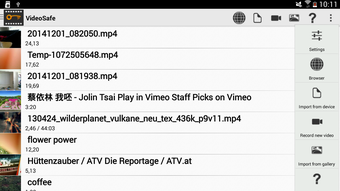
Video Safe features a clean and intuitive user interface designed for ease of navigation. The workflow begins with launching the app and entering the password, which grants access to the vault. From there, users can import videos from their device’s media library and manage them within the secure environment. The interface is minimalistic, focusing on essential actions such as adding, viewing, and managing videos, which reduces cognitive load and improves usability.
Navigation appears to be straightforward, relying on a linear flow: access → import → secure → view. This simplicity enhances workflow efficiency, allowing users to complete tasks in just a few taps. The app is designed to be lightweight, suggesting efficient use of system resources. However, the developer did not specify resource usage details such as CPU or RAM consumption. Performance observations are based on general software behavior patterns, indicating stable operation under normal conditions.
Stability is not explicitly confirmed, but the app’s lightweight nature and focus on core functionality suggest a low risk of crashes or slowdowns. The lack of reported issues in user downloads implies acceptable reliability. While real-world performance metrics are not available, the app’s design philosophy emphasizes responsiveness and minimal impact on device performance. For users seeking a secure, no-frills video protection tool, Video Safe offers a practical and accessible solution without unnecessary complexity.
Compatibility & System Requirements
Video Safe is compatible with Android 13.0 and above, indicating support for modern Android devices with updated security and privacy features. This ensures the app can leverage system-level protections such as biometric authentication and secure storage, which may enhance overall security. The app’s file size is 10.4 MB, which is relatively small and suitable for devices with limited storage capacity.
Exact system requirements were not listed. The developer did not provide information on minimum RAM, CPU specifications, or storage recommendations. Compatibility with older Android versions is not confirmed, and the app may not function on devices below Android 13.0. Installation and operation are expected to be smooth on supported devices, given the app’s lightweight nature. However, users with older or low-end devices should verify compatibility before downloading.
Platform compatibility information is limited to the minimum OS version. No details were provided regarding hardware acceleration, background processes, or battery impact. The developer has not disclosed whether the app requires internet access or operates entirely offline. Users should consider these factors when assessing suitability for their specific device and usage context.
Pros and Cons
Pros
- Free to download and use with no hidden costs.
- Lightweight design with minimal storage footprint (10.4 MB).
- Supports password protection and icon hiding for enhanced privacy.
- Simple, intuitive interface suitable for all user levels.
- Available in both English and Spanish for broader accessibility.
- Designed for Android 13.0 and above, ensuring modern security standards.
Cons
- Compatibility limited to Android 13.0 and above; not available on older devices.
- Exact system requirements and performance data were not provided.
- No information on encryption type or advanced security features.
- Developer has not released detailed documentation or support resources.
- Offline functionality is assumed but not confirmed.
FAQ Section
Is Video Safe available for devices running Android below 13.0?
Video Safe requires Android 13.0 or higher. It is not compatible with older versions of the operating system.
Does Video Safe require an internet connection to function?
The app is designed to work offline. It does not require an internet connection to store, protect, or view videos.
Can I change my password after setting it up?
Yes, the app allows users to set and modify their password at any time.
Is Video Safe safe to download and use?
Video Safe is available for download on Softonic, a trusted platform. The app is free and does not appear to contain ads or malicious components based on available information.
How do I hide the app icon from my device?
The app includes a built-in feature to hide the icon from the home screen and app drawer, providing an additional layer of discretion.
Final Thoughts + CTA
Video Safe offers a practical and accessible solution for Android users seeking to protect private video content. Its lightweight design, intuitive interface, and core security features—password protection and icon hiding—make it a compelling choice for individuals prioritizing privacy. While detailed technical specifications are limited, the app’s focus on simplicity and security aligns with the needs of everyday users. It is especially well-suited for those who want a no-frills, free tool to safeguard personal recordings without the complexity of advanced software.
Although it is not compatible with older Android versions, its support for modern devices ensures it can leverage current security standards. The absence of detailed system requirements or performance data is a minor drawback, but the app’s lightweight nature suggests minimal impact on device performance. For users who value discretion and control over their private media, Video Safe delivers a reliable and straightforward experience.
Download Video Safe now and take control of your private video security today.





.png)

